How to Run SharePoint Agent Access Insights Reports with PowerShell (macOS & Windows 11)
Copilot agents are quietly accessing your SharePoint sites right now. Do you know which ones — and what they’re reading?
Microsoft recently introduced the Agent Access Insights Report as part of SharePoint Advanced Management. It shows every declarative agent interacting with your SharePoint and OneDrive content: how often, on which sites, and under what governance conditions. For any M365 admin serious about Copilot governance, this report is essential. Getting it to run, however, is a different story.
Here is what I learned the hard way — on both macOS and Windows 11.
Why macOS Makes This Hard
The SharePoint Online Management Shell (Microsoft.Online.SharePoint.PowerShell) is a Windows-first module. On macOS, you will hit two recurring blockers:
- “Object reference not set to an instance of an object” — the module loads but
Connect-SPOServicesilently fails - Assembly version conflicts — if PnP PowerShell is loaded in the same session, DLL clashes break both modules
PnP PowerShell (PnP.PowerShell 3.2.x) is the reliable alternative on macOS, but it does not include the Start-SPOM365AgentAccessInsightsReport or Get-SPOM365AgentAccessInsightsReport cmdlets. Those live exclusively in the SPO Management Shell.
Bottom line: For Agent Access Insights via PowerShell, you need Windows.
The Working Setup: Windows 11 + SPO Management Shell
Step 1 — Install and connect
Open PowerShell as Administrator, then run:
powershell
[Net.ServicePointManager]::SecurityProtocol = [Net.SecurityProtocolType]::Tls12
Install-Module Microsoft.Online.SharePoint.PowerShell -Force -AllowClobber
Import-Module Microsoft.Online.SharePoint.PowerShell

Connect-SPOService `
  -Url https://YOURTENANT-admin.sharepoint.com `
  -ModernAuth $true `
  -AuthenticationUrl https://login.microsoftonline.com/organizations
Step 2 — Generate the report
Run in powershell this command note: Each report can only run once every 24 hours. Update your SharePoint PowerShell Module to the latest version, command “Start-SPOM365AgentAccessInsightsReport” is quite new.
Start-SPOM365AgentAccessInsightsReport -ReportPeriodInDays 28Step 3 — Check status and view results
powershell
Get-SPOM365AgentAccessInsightsReport

Get-SPOM365AgentAccessInsightsReport `
  -ReportId <your-report-id> `
  -Action View `
  -Content M365AgentsOnSites
Note:
Export-SPOM365AgentAccessInsightsReportdoes not exist — despite what the Microsoft docs imply. Download also runs throughGet-SPOM365AgentAccessInsightsReport -Action Download.
What the Report Actually Tells You
A real-world output from a small tenant revealed four declarative agents active across three sites:
Let`s look closer into my exported file “M365AgentAccessInsightsReport_2026-05-21_17-40-29.csv”:

I can see in Excel the following insights because I know how to read the report:
Every site had RestrictContentDiscovery: No and RestrictSiteAccess: No — meaning agents can access content freely, and that content is externally shareable. For governance-conscious organizations, these are the exact settings to review first.
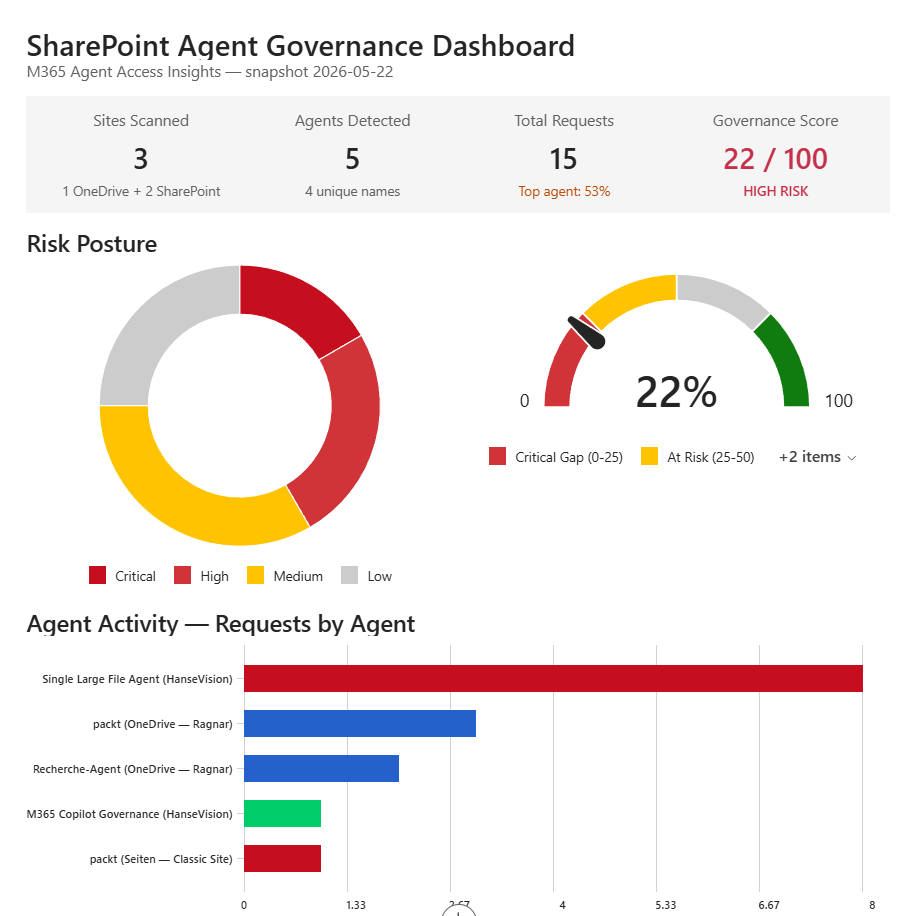
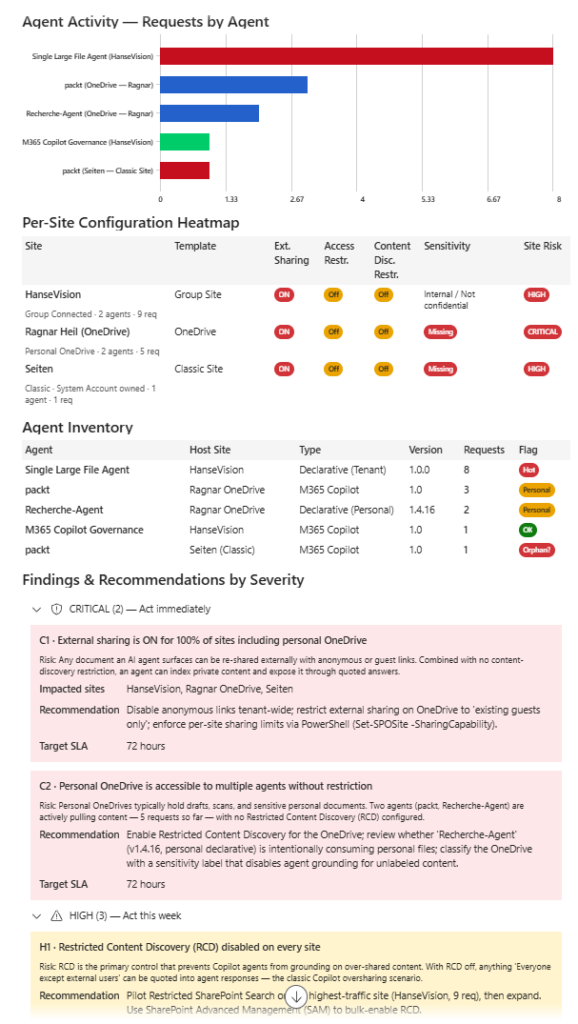
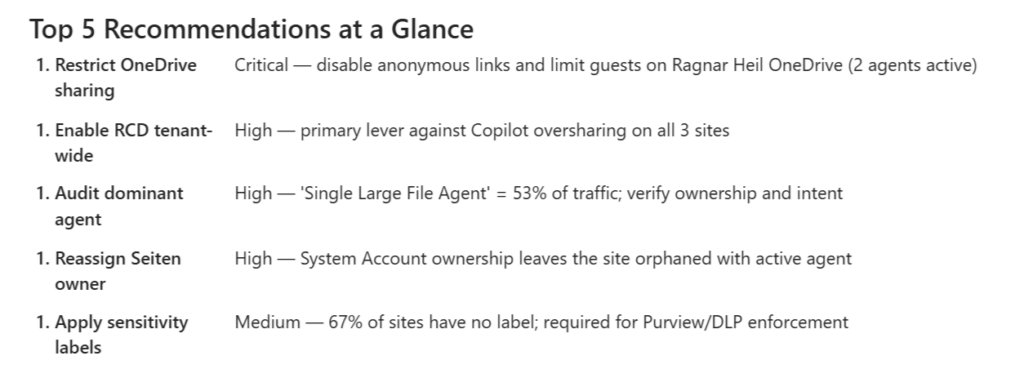
Let`s switch gears and do something more sophisticated and advanced: I am going to upload the csv-report from SharePoint Advanced Management into Copilot Cowork (using Opus 4.7):

I am impressed about the quality of insights and visualisations I have received by Copilot Work – what a difference to Excel diagrams!
Key Takeaways for M365 Admins
- macOS is not supported for SPO Management Shell — use Windows or a Windows VM
- Never mix SPO Management Shell and PnP PowerShell in the same session
- The correct download cmdlet is
Get-SPOM365AgentAccessInsightsReport -Action Download, notExport- - Without a SharePoint Advanced Management or M365 Copilot license, enable data collection first:
Start-SPOAuditDataCollectionForActivityInsights -ReportEntity M365AgentInsights - Reports cover max 28 days — only one report per time range exists at a time
Agent sprawl is real. This report makes it visible.
Your next steps
Talk to us at HanseVision about your SharePoint, Modern Intranet or Copilot AI needs. Find my calendar for a free meeting here.





One Comment