Copilot Studio Harness Pricing: What the August 2026 Licensing Guide Changes (and free licensing trick)
Copilot Studio now prices by harness. Not by seat. Not by agent. Microsoft’s August 2026 Licensing Guide confirms three harnesses, three billing behaviors.
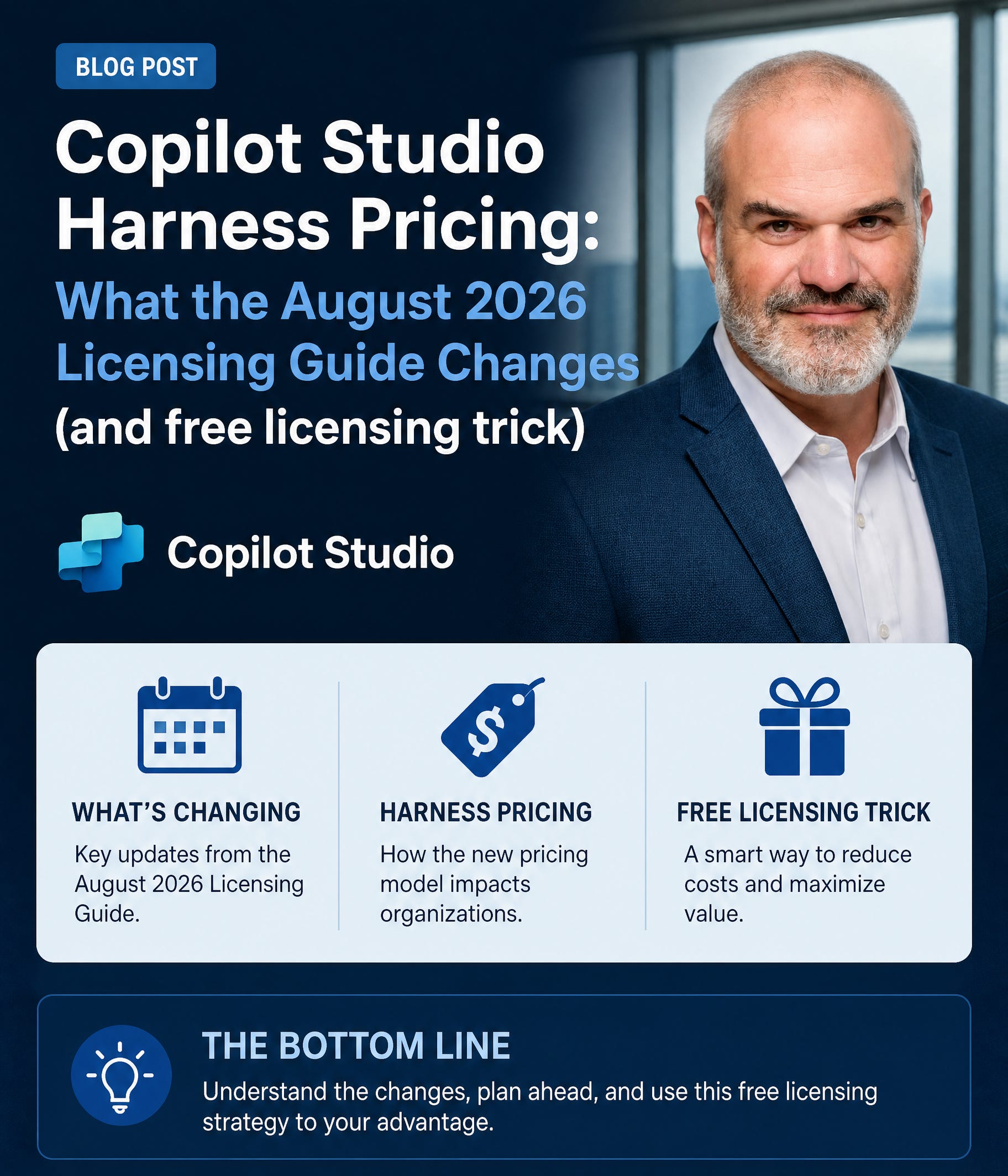
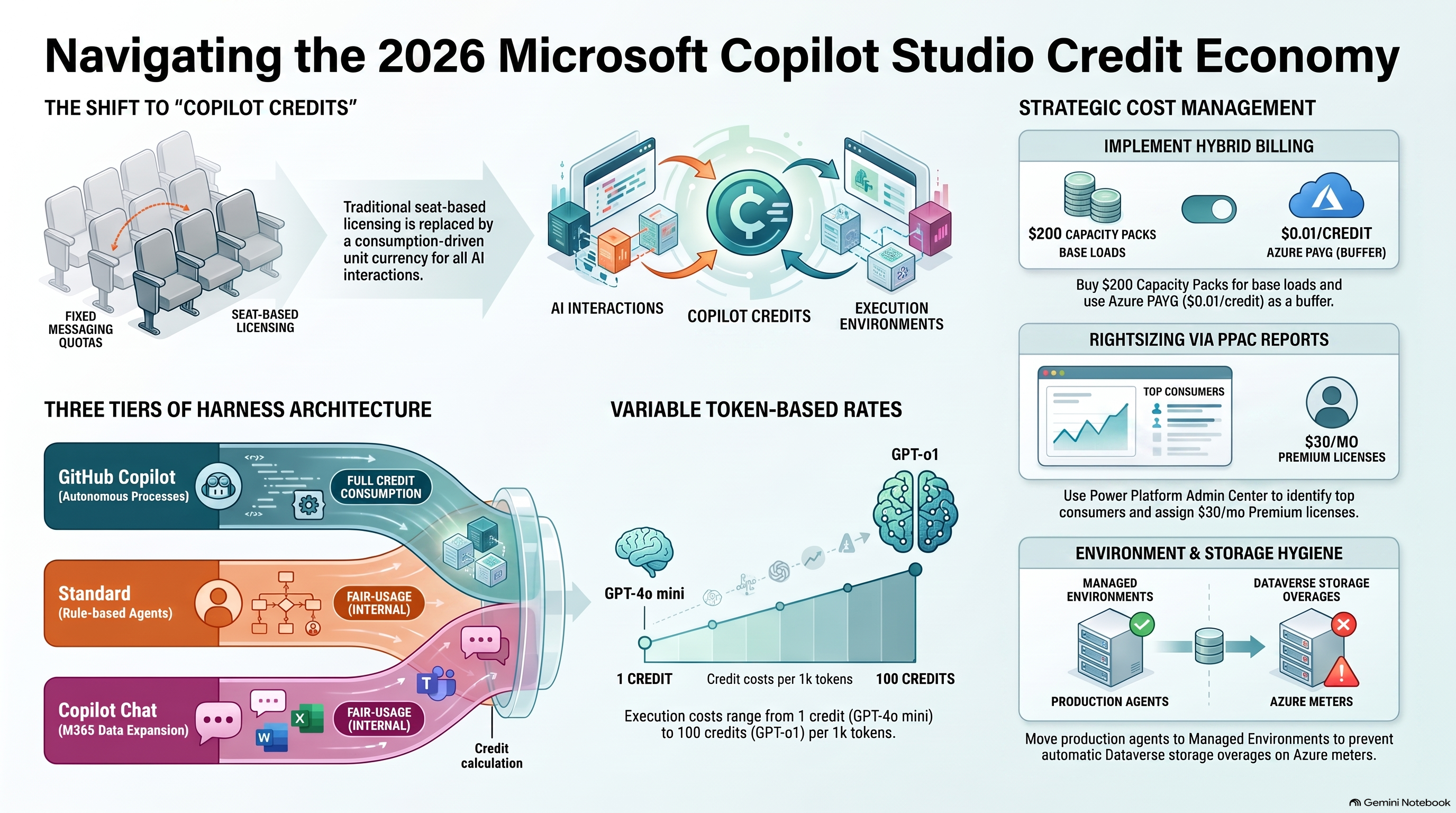
Three Harnesses, Three Ways Credits Get Consumed
Every agent runs on a harness. A harness is the scaffolding. It lets an agent plan, reason, and act.
Copilot Studio ships three: GitHub Copilot Harness. Standard Harness. Copilot Chat Harness. Each burns Copilot Credits differently.
GitHub Copilot Harness
Built for end-to-end business processes. Think accounts payable agents. Reading invoices, matching purchase orders, routing approvals.
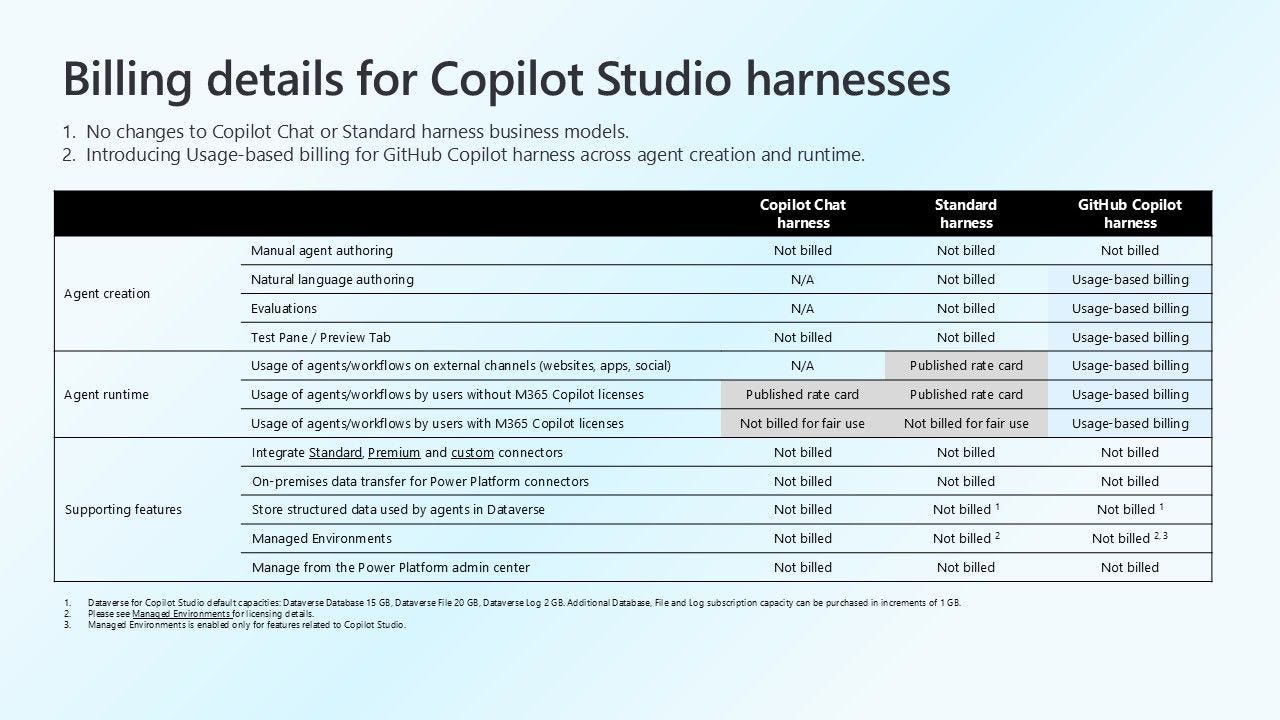
This harness consumes Copilot Credits twice. Once during creation. Again during runtime execution. Building costs credits. Running costs credits too.
Standard Harness
Built for rule-based conversational agents. Predefined topics, predefined flows. An IT onboarding agent, for example.
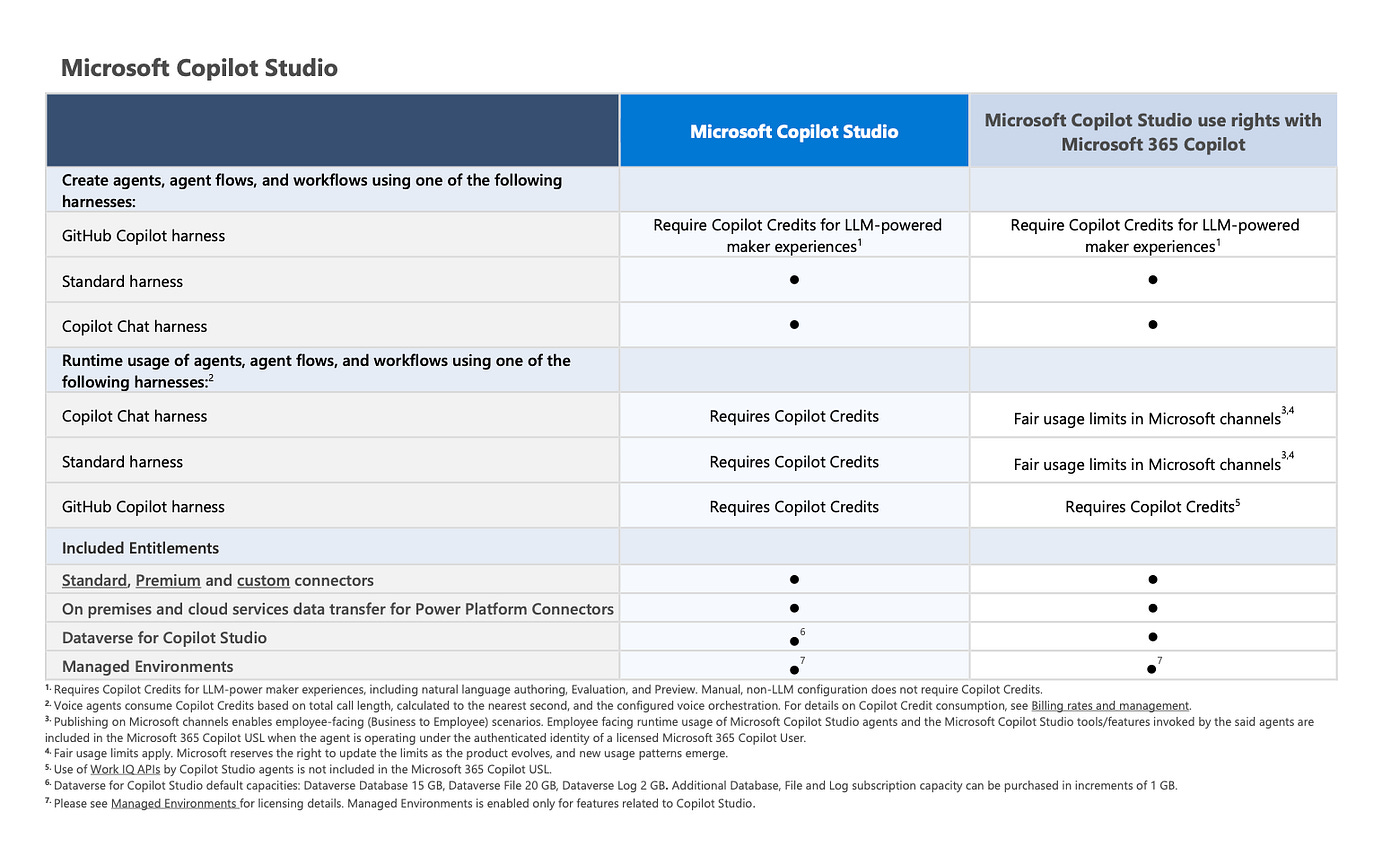
Standard Harness agents are also billed through Copilot Credits. But runtime usage is subject to fair usage limits within Microsoft channels.
Copilot Chat Harness
Built to extend Microsoft 365 Copilot. Adds your organization’s knowledge sources. SharePoint content, for instance.
Same billing logic as Standard. Copilot Credits for LLM-powered maker experiences. Fair usage limits at runtime, inside Microsoft channels.
The Real Difference: Runtime Billing
Here’s the part builders miss. Standard and Copilot Chat harness runtime differently than GitHub Copilot.
Publish a Standard or Copilot Chat agent on Microsoft channels. Employee-facing, authenticated Microsoft 365 Copilot users. That usage falls under fair usage limits. Often no extra Copilot Credits.
GitHub Copilot Harness works differently. Runtime always requires Copilot Credits. No fair-usage carve-out. Every execution, every credit, billed.
One footnote matters most: LLM-powered maker experiences include natural language authoring, Evaluation, and Preview. Manual, non-LLM configuration doesn’t touch credits.
The GitHub Copilot Testing Trick — Still Real?
Expert Inside’s Yumin Zhao found a pattern earlier this week (kudos to MVP Fabian Moritz for sharing!): Testing a GitHub Copilot Agent inside Copilot Studio’s Preview panel. Billed Copilot Credits stayed flat. Non-billed credits climbed instead.
The reason: the pva-studio channel. Preview testing routes through it. Microsoft treated it as a protected maker sandbox, not production billing.
Set a DEV environment credit limit to zero. Test heavily. Watch the Analytics Dashboard. Billed credits: zero. Non-billed credits: hundreds.
Here’s the update. The August 2026 Licensing Guide now explicitly lists Preview as an LLM-powered maker experience that requires Copilot Credits. That’s new, documented language.
So proceed carefully. The empirical loophole existed. Documentation now names Preview directly. Test in pva-studio, but monitor your own consumption before assuming zero cost.
What This Means for Your Rollout
Building with GitHub Copilot Harness? Budget for both phases. Creation credits and runtime credits, both real.
Building with Standard or Copilot Chat Harness? Runtime often rides fair usage limits. Cheaper at scale, inside Microsoft channels.
Either way, check the Power Platform AND M365 Admin Center. Confirm actual consumption. Don’t rely on last quarter’s assumptions. Keep in mind that end users and Agent Makers won’t receive budget alerts. It is all up to you, dear IT Admin.
FAQ
Does GitHub Copilot Harness cost more than Standard Harness? Often, yes. It consumes Copilot Credits at both creation and runtime, with no fair-usage runtime carve-out like Standard or Copilot Chat harnesses.
Is Preview still free to test in? The August 2026 guide now lists Preview as an LLM-powered maker experience requiring Copilot Credits. Test in pva-studio, but verify your own tenant’s billed vs. non-billed numbers.
What counts as an LLM-powered maker experience? Natural language authoring, Evaluation, and Preview. Manual, non-LLM configuration is excluded from Copilot Credit consumption.
Do fair usage limits mean unlimited runtime? No. Fair usage limits apply to Standard and Copilot Chat harness agents published on Microsoft channels under a licensed Microsoft 365 Copilot user. Microsoft can adjust these limits as usage patterns evolve.
How do I find GitHub Copilot Harness agents already running in my tenant?
Query Power Platform Inventory for the isCLIAgent property. It flags every agent built on the GitHub Copilot Harness and returns it together with its environment ID and owner ID — the fastest way to build a governance baseline before you set limits.
Download Microsoft Copilot Studio Licensing Guide | August 2026
My verdict and your next steps
August 2026 Microsoft Copilot Studio Licensing Guide establishes a flexible yet architecturally complex AI economy for enterprises. To prevent uncontrolled cost escalation, organizations should combine prepaid Copilot Studio Capacity Packs for predictable baselines with a strictly capped Azure pay-as-you-go meter. IT decision-makers must assign harness types based on actual need, reserving the expensive GitHub Copilot Harness for high-value automations while running standard bots under fair-usage rules on internal Microsoft channels. Leveraging Power Platform Admin Center usage reports allows administrators to identify high-volume consumers and transition them to dedicated Microsoft 365 Copilot licenses, which is often more economical than paying for consumption credits. Lastly, enforcing strict environment hygiene by restricting agent creation in the Default Environment and utilizing Managed Environments prevents costly Dataverse storage overages.
Harness choice now drives your Copilot Studio bill. GitHub Copilot Harness: credits at build and run. Standard and Copilot Chat: fair usage at runtime.
Consider testing more in pva-studio channel. Read the footnotes closely. The August 2026 guide changed the fine print — your budget should follow it.
Need help mapping harness choice to your agent portfolio? HanseVision advises on exactly this decision.
PS: Ready to implement proper AI agent governance? Contact me, Ragnar Heil, for a consultation on Agent 365, SharePoint Advanced Management, Microsoft Purview (Information Protection, Data Loss Prevention Policies, DSPM for AI), EasyLife365 Collaboration, Solutions2Share, Rencore Governance, ShareGate Protect, Data&More or Agent 365 deployment strategies tailored to your organization’s needs. Find my calendar here at our HanseVision Governance Landing Page. Pssst… I am also offering an exquisite M365 Copilot & Agents MasterClass. Find out more here.
Read more: