GitHub Copilot Harness: Governance Mistakes & Fixes
The GitHub Copilot Harness in Microsoft Copilot Studio consumes Copilot credits from the moment you start building an agent — unlike the Standard Harness, which is free during design and testing. If you don’t lock down credit settings before makers start experimenting, you risk unplanned consumption across every environment in your organization.
The Problem: An Unblockable Upgrade Prompt
Microsoft recently introduced a “New Copilot Studio experience” banner that appears in every environment, tenant-wide. There is no setting — at the environment or tenant level — to hide it. When a maker clicks “Try new,” they’re offered three build paths, and two of them are powered by the new GitHub Copilot (GHCP) Harness. Microsoft MVP, Copilot Studio Expert and Community contributor Daniel Christian breaks this down in detail on YouTube, walking through exactly where the risk sits and how to shut it down.
This matters because the GHCP Harness replaces the underlying orchestration model entirely. While the Standard Harness lets you build and test without cost, the GHCP Harness draws Copilot credits as soon as orchestration begins — even before an agent goes live. Existing M365 Copilot or E7 licenses don’t cover this; additional credits must be purchased separately through capacity packs or a pay-as-you-go plan, as Microsoft’s own capacity management documentation confirms.
Top Mistakes to Avoid
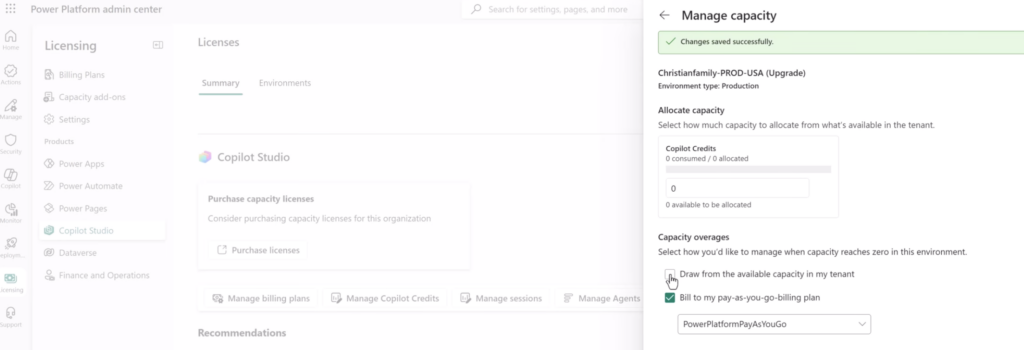
Leaving the tenant credit pool open. The most common mistake is leaving “Draw from available capacity in my tenant” enabled. This setting sits in the Power Platform Admin Center under Licensing → Copilot Studio → Manage Copilot Credits, and it’s checked by default on newly created managed environments. Left unchecked, every environment can silently pull from your shared credit pool the moment someone tests a GHCP-based agent.
Assuming GHCP is automatically the better choice. Microsoft’s technical documentation, released by the Microsoft CAT team, explicitly states that organizations satisfied with their Standard Harness agents should stay on it. Rich UI components — Adaptive Cards for both displaying and capturing input — aren’t yet supported in the GHCP Harness; Microsoft confirms this is still under active development.
Skipping per-agent limits. Even with tenant-pool drawing disabled, an individual agent can still overconsume. Microsoft’s admin center lets you set a monthly consumption limit per agent, independent of whether the environment runs on prepaid capacity or pay-as-you-go.
Best Practices for Governing Credit Consumption
Manual control: For smaller tenants, review each environment individually in the Admin Center and uncheck the tenant-pool setting, then save.
Automated control at scale: Microsoft provides a PATCH API to set tenantPool to false programmatically — the same effect as unchecking the box manually. Building a Power Automate flow around this API lets you audit and correct credit settings across many environments at once, using a GET call to confirm status and a PATCH call to enforce it. One caveat: the Admin Center UI can lag behind the API by up to an hour, so trust the API response over the checkbox display when verifying a change. Watch Daniel Christian’s Video to find out how to setup the Power Automate Flow to scale the bulk change.
Set monthly agent limits and guardrails. From the admin center’s Agents page, configure a monthly credit limit per agent, monitor its status as Nearing limit, Over limit, or Within limit, and turn agents off directly if needed. Two guardrails make this proactive: notifications that alert admins at environment and tenant level as usage approaches the limit, and a hard stop that automatically disables an agent once it hits its cap.
Review consumption trends before allocating. The Capacity summary and Copilot credit capacity tabs show daily consumption for up to three months and monthly history for a full year — useful data for right-sizing budgets before makers adopt the GHCP Harness at scale.
Implementation Guide
- Confirm you hold the Power Platform Admin role in Entra.
- Pull a list of all environments (CoE Starter Kit, Dataverse, or a SharePoint list all work).
- Run a GET call per environment to check current
tenantPoolstatus. - Patch any environment with
tenantPool: truetofalse. - Set monthly limits and notification guardrails for high-risk agents.
- Test on two or three environments before rolling the flow out in bulk.
Setting this governance baseline before makers adopt the GHCP Harness protects your budget and gives decision-makers visibility into consumption before it becomes a billing surprise. If you’d like support building this governance framework or the underlying Power Automate flow for your tenant, book a Copilot Studio governance consultation with HanseVision.
FAQ
What is the GitHub Copilot Harness in Copilot Studio?
It’s a new orchestration model in Copilot Studio that replaces manual configuration with an AI-driven build process, distinct from the Standard and Copilot Chat Harnesses.
Why do credits get consumed even while building?
Because the GHCP Harness changes the orchestration layer itself — credit consumption starts as soon as orchestration runs, not just when an agent goes live.
How do I automate credit governance across many environments?
Use Microsoft’s PATCH API for licensing allocations inside a Power Automate flow, setting tenantPool to false for each environment, and pair it with per-agent monthly limits for extra protection.
Do I have to switch to the GHCP Harness?
No. Microsoft explicitly recommends staying on the Standard Harness if it already meets your needs, particularly if you rely on Adaptive Cards for UI.
Find my other Copilot Studio Blogpost here
PS: Ready to implement proper AI agent governance? Contact me, Ragnar Heil, for a consultation on Agent 365, SharePoint Advanced Management, Microsoft Purview (Information Protection, Data Loss Prevention Policies, DSPM for AI), EasyLife365 Collaboration, Solutions2Share, Rencore Governance, ShareGate Protect, Data&More or Agent 365 deployment strategies tailored to your organization’s needs. Find my calendar here at our HanseVision Governance Landing Page. Pssst… I am also offering an exquisite M365 Copilot & Agents MasterClass. Find out more here.