GitHub Copilot Harness: Find & Control Copilot Credit Costs
Your Copilot Studio bill can grow before a single agent goes live. GitHub Copilot Harness agents consume Copilot Credits the moment a maker builds, previews, or evaluates them — no production deployment required. If you’re not tracking this, you’re flying blind on cost. Here’s the fix: a five-step governance process that finds these agents, classifies their environments, and closes the exposure.
The Hidden Cost Problem
Most admins assume consumption starts at go-live. Wrong assumption. Maker exploration alone can drain Copilot Credits, and that shift changes when you need to step in with controls. Two scenarios need two different approaches:
– Maker development — makers exploring, building, testing agents. Needs a tight boundary.
– Funded production — approved, accountable, intentionally funded usage. Needs ownership and monitoring, not restriction. Same toolset. Different application, depending on purpose.
Step 1: Find Your Harness Agents
You can’t govern what you can’t see. Every GitHub Copilot Harness agent carries a property: `isCLIAgent`. Query Power Platform Inventory, filter on that property, and you get the agent, its environment, and its owner — in one request. Small estate? The inventory view in the Power Platform Admin Center (PPAC) is enough. Larger tenant? Use the Inventory API or Azure Resource Graph to make review repeatable.
Step 2: Classify the Evironment
For each agent found, answer four questions: Which environment holds it? Is that environment maker development or funded production? Who owns the agent, and who’s accountable for its consumption? Does current allocation match that purpose? This is where your naming conventions, environment groups, and approval records earn their keep. Inventory gives you the technical relationship. Your governance metadata gives you the business context.
Step 3: Apply the Controls In PPAC
Go to Licensing > Copilot Studio > Manage Copilot Credits. Four decisions per environment:
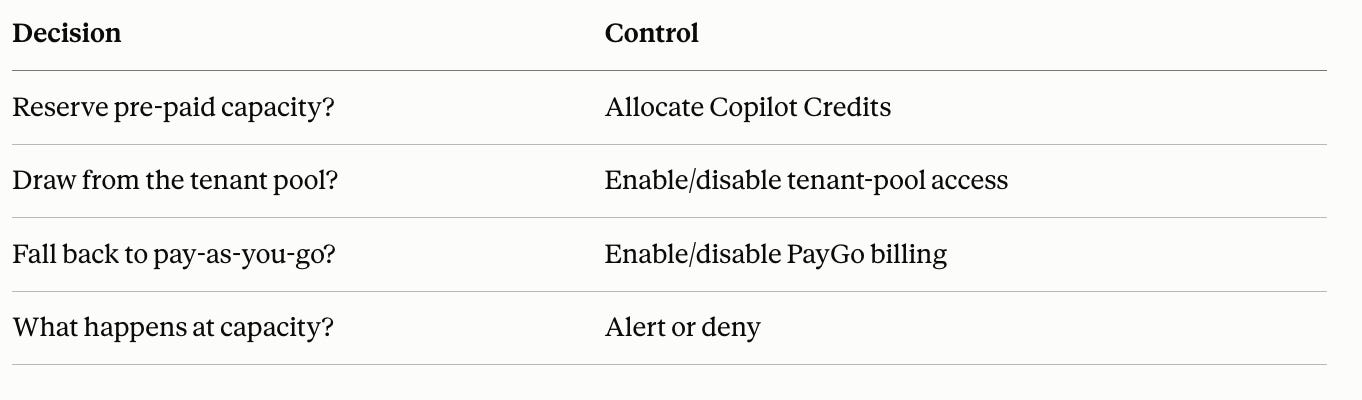
One detail catches admins off guard: letting environment admins manage allocations doesn’t limit them to their own environment. It gives them allocation control tenant-wide. Keep that restricted to tenant admins unless you mean to grant it broadly.
Step 4: Set Agent-Level Limits Environment controls
set the shared boundary. Agent limits set an individual one. In PPAC, go to Licensing > Copilot Studio > Manage Agents, pick an agent, and set a monthly credit limit with a notification threshold. At scale, use the Update Resource Threshold API to push limits programmatically across your estate.
The Gap That’s Still Open
Agent limits don’t cap total environment consumption — that’s a real gap right now. Microsoft has announced environment-level limits via Message Center item MC1451872, but they’re not live yet. Until they land, unlinking a billing policy is your fallback to stop environment-wide overage.
Your Next Step
Discovery, classification, controls, agent limits, repeat. That’s the loop. Run it once manually to baseline your tenant, then automate detection for new environments and agents going forward. Need help mapping this to your Copilot Studio estate? HanseVision advises on exactly this — Agent 365, Purview, and Copilot governance built for how your organization actually works.
FAQ
- How do I find GitHub Copilot Harness agents already in my tenant?
Query Power Platform Inventory for the `isCLIAgent` property. It returns every Harness agent along with its environment ID anowner ID. - Can environment admins accidentally get tenant-wide credit control?
Yes. The tenant setting that lets environment admins manage Copilot Credit allocations applies across all environments, not just the ones they administer. Restrict it to tenant admins unless broader access is intentional. - Do agent-level limits stop an environment from overspending?
No. They cap individual agents only. Environment-level limits are coming via MC1451872, but aren’t available yet. - What’s the fallback until environment-level limits ship?
Unlink the environment’s billing policy to stop further pay-as-you-go consumption
PS: Ready to implement proper AI agent governance? Contact me, Ragnar Heil, for a consultation on Agent 365, SharePoint Advanced Management, Microsoft Purview (Information Protection, Data Loss Prevention Policies, DSPM for AI), EasyLife365 Collaboration, Solutions2Share, Rencore Governance, ShareGate Protect, Data&More or Agent 365 deployment strategies tailored to your organization’s needs. Find my calendar here at our HanseVision Governance Landing Page. Pssst… I am also offering an exquisite M365 Copilot & Agents MasterClass. Find out more here.