When Your AI Assistant Follows the Wrong Instructions: Skill Poisoning in Copilot Cowork
Imagine you are the new CFO of a fast-food chain. To keep up with your inbox, you ask Copilot Cowork to summarize the top ten newsletters from your private Gmail account every morning. It saves time, and nobody in IT ever hears about it.
At AltSecCON 2026, a red-team speaker from Altered Security showed how an attacker can turn exactly this convenience into a data leak. The victim in the demo, Elizabeth Wilson, is fictional, but the attack chain is real.
Why skills matter
Copilot Cowork is Microsoft’s built-in agent next to the Copilot chat, grounded in organizational data through Work IQ. Too much context causes hallucinations and abandoned tasks, so Cowork loads skills only when needed.
A skill is a folder with a skill.md file (name, description, workflow instructions) plus optional scripts, assets and references. The catch: Cowork stores skills and task outputs in the user’s own OneDrive under Documents/Cowork. Whoever controls that OneDrive controls what the agent treats as instructions.
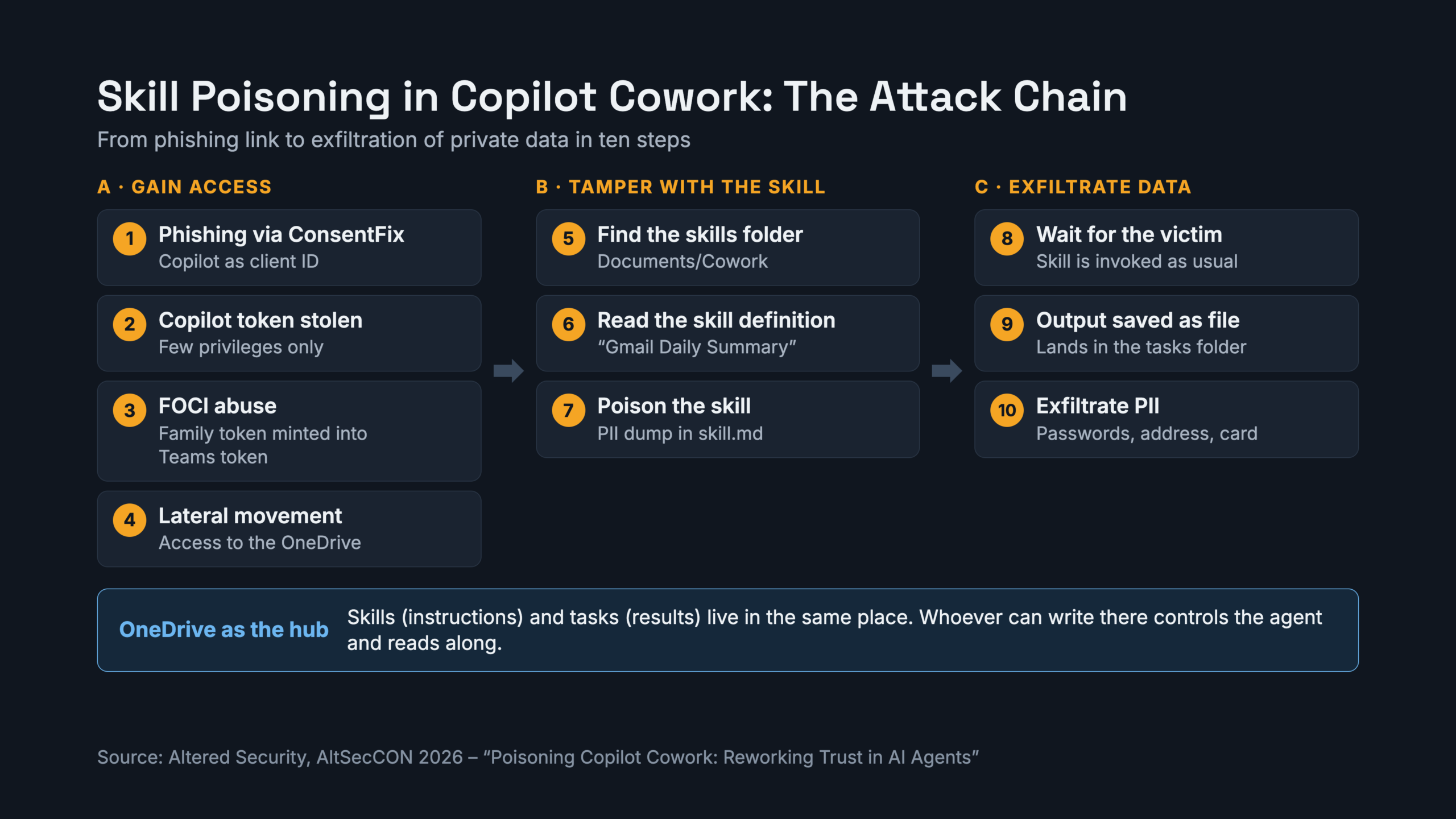
The attack in ten steps
Phase A: Get in
- Phish with ConsentFix. The victim receives a fake HR link and hands over an authorization code. The attacker uses Copilot itself, a first-party app, as the client ID, which looks less suspicious.
- Collect the tokens. The attacker receives access, refresh and ID tokens. The Copilot token carries few privileges.
- Abuse FOCI. With the family refresh token, the attacker mints an access token for Microsoft Teams, which has far broader Graph permissions.
- Move laterally. The Teams token opens the victim’s OneDrive.
Phase B: Poison the skill
- Find the skills folder in
Documents/Cowork. - Read the skill definition. The CFO’s “Gmail Daily Summary” skill reaches her private Gmail through a marketplace plugin connector.
- Replace
skill.md. The original (523 bytes) is swapped for a version that still delivers the newsletter summary, then appends a PII dump and tells the agent to save the result as a file.
Phase C: Wait and harvest
- Wait. Nothing happens until the CFO runs her skill as usual.
- Output lands in OneDrive. Cowork saves outputs to the task folder by default.
- Read the task folder. It contains her private Gmail address, a Netflix password shared with her father, her home address and husband’s name, temporary onboarding credentials and a credit card number stored in an email.
The attacker never touched Gmail directly. The victim’s own agent did the work.
Why it worked
In the agent’s reasoning, no guardrail was violated, because the data was only written to the user’s own OneDrive and not shared publicly. The attack combines indirect prompt injection with a supply-chain element: the malicious instruction sits in a file the agent trusts.
The speaker also named limits. It worked for roughly two months, Microsoft is rolling out Enterprise Data Protection in Cowork, and building a working poisoned skill took a lot of trial and error. This is no CVE, just known building blocks (consent phishing, FOCI token abuse, write access to OneDrive) chained cleverly.
What to do about it
These are my own recommendations derived from the talk, not Microsoft guidance:
- Limit plugin and connector approval to admins. Check that users cannot add arbitrary plugins.
- Discourage private connectors such as personal Gmail in corporate agent setups.
- Harden against consent phishing with Conditional Access, restricted user consent and token protection.
- Monitor
Documents/Cowork, especially changes toskill.md. - Treat skills like code. Give them owners, reviews and change tracking.
- Test your agents. The speaker recommends Microsoft’s PyRIT for automated prompt-injection testing.
The takeaway
An agent is only as trustworthy as the place where its instructions live. If that place is a user’s OneDrive, then OneDrive security is agent security.
Source: “Poisoning Copilot Cowork: Reworking Trust in AI Agents”, Altered Security, AltSecCON 2026